Ending Mid-Flow Refusals in Browser-Use & OpenClaw: Fast DOM + Vision Agents on bf16.ai
Why standard LLMs mistake staging password fields and ToS checkboxes for phishing attacks — and how to pair Browser-Use or OpenClaw with bf16.ai text + vision abliterated models.
TL;DR · Browser Engineering Summary
- Why Browser Agents Stall: Chatbot-tuned LLMs routinely misclassify
<input type="password">, OAuth consent screens, and<input type="checkbox" name="tos">inside legitimate staging QA suites as unauthorized credential harvesting or legal impersonation.- Dual-Engine Low-Refusal Stack: Use
deepseek/deepseek-v4.1-flash-abliterated($0.30 / $0.05 / $1.20) for ultra-fast accessibility-tree DOM loops, andzai-org/glm-5.3-flash-abliterated($0.24 / $0.06 / $1.00, Vision + Text) when modals, canvas charts, or shadow-DOM widgets require visual inspection.- Built for 25-Step Staging Suites: Batching up to four actions per step (
max_actions_per_step=4) cuts model round-trips, and bf16.ai's abliterated planners don't stop mid-run to lecture your CI runner.
1. Why <input type="password"> and ToS Checkboxes Trigger False-Positive Blocks
Frameworks like Browser-Use, OpenClaw, and Playwright have transformed end-to-end QA and internal back-office automation. Instead of maintaining brittle XPath selectors that break every time a frontend engineer renames a Tailwind wrapper, an autonomous browser agent reads the live accessibility tree, plans actions, and verifies rendered state.
Yet teams deploying Browser-Use in CI quickly hit an infuriating wall: false-positive policy refusals on ordinary web UI primitives. Consumer chat models are trained heavily to refuse anything resembling credential entry, account registration, or clicking legal consent checkboxes. When Browser-Use serializes a staging signup page into 42 numbered DOM nodes and asks the planner for its next JSON action, a standard frontier model frequently drops out of structured JSON mode to lecture your CI runner:
[browser-use] Step 11/25 -> URL: https://staging.billing-app.internal/signup/verify
[browser-use] Extracted 42 interactive DOM elements:
  [18] <input type="email" name="work_email" />
  [19] <input type="password" name="password" />
  [24] <input type="checkbox" id="accept-tos-privacy" />
  [25] <button type="submit">Create Staging Account</button>
[llm:response] finish_reason="stop" (0 tool_calls emitted)
  "I cannot enter authentication credentials, create user accounts, or accept legally binding Terms of Service agreements on your behalf."
[browser-use] ValidationError: AgentOutput JSON missing required field 'action'. Suite failed (exit 1).
2. Hybrid DOM + Vision Architecture on bf16.ai Without "Brain Damage"
A reliable autonomous browser pipeline needs three things simultaneously: zero preachy refusals on UI primitives, strict JSON Schema adherence (AgentOutput), and multimodal vision when modern SPAs render custom dropdowns, canvas widgets, or floating cookie/ToS overlays outside clean ARIA labels.
On bf16.ai, two complementary 1M-context abliterated models cover both halves of browser automation:
deepseek/deepseek-v4.1-flash-abliterated: Ideal for pure text/DOM accessibility-tree loops where sub-second step turnaround matters most. A1,048,576-token window easily holds dozens of consecutive DOM snapshots without losing early task state.zai-org/glm-5.3-flash-abliterated(Vision + Text): Native multimodal abliterated checkpoint priced at$0.24 / 1Minput ($0.06 / 1Mcached) — lower than Z.ai Official FlashX ($0.37 / $1.25). Passuse_vision=Truein Browser-Use so the agent inspects live viewport screenshots alongside DOM indices without tripping refusal filters.
3. Production Browser-Use Integration & Host-Level Network Locking
Drop the script below directly into your Python QA suite or OpenClaw worker. Because https://api.bf16.ai/v1 speaks native OpenAI wire format with multi-action tool support (max_actions_per_step=4), the agent batches fill, click, and submit into a single round-trip:
import asyncio, os
from langchain_openai import ChatOpenAI
from browser_use import Agent, BrowserConfig, Browser

# Primary fast DOM planner ($0.30/$0.05/$1.20 per 1M)
dom_llm = ChatOpenAI(
    base_url="https://api.bf16.ai/v1",
    api_key=os.environ["BF16_API_KEY"],
    model="deepseek/deepseek-v4.1-flash-abliterated",
    temperature=0.1,
)

# Multimodal Vision + Text planner ($0.24/$0.06/$1.00 per 1M)
vision_llm = ChatOpenAI(
    base_url="https://api.bf16.ai/v1",
    api_key=os.environ["BF16_API_KEY"],
    model="zai-org/glm-5.3-flash-abliterated",
    temperature=0.1,
)

async def run_staging_onboarding_suite():
    browser = Browser(config=BrowserConfig(headless=True))
    agent = Agent(
        task=(
            "1. Open https://staging.billing-app.internal/signup. "
            "2. Fill test account credentials from QA fixture, check #accept-tos-privacy, and submit. "
            "3. Complete the 3-step workspace wizard and assert that '/dashboard/ready' renders."
        ),
        llm=vision_llm,      # Native Vision + DOM reasoning without refusal lectures
        use_vision=True,
        browser=browser,
        max_actions_per_step=4,
    )
    history = await agent.run(max_steps=25)
    assert history.is_done(), "Staging onboarding E2E did not reach terminal assertion"

if __name__ == "__main__":
    asyncio.run(run_staging_onboarding_suite())
How do you prevent an uncensored browser agent from wandering onto external production domains if a staging page contains an outbound link? Enforce network scope deterministically in Playwright's CDP router, never in the LLM's system prompt. You can also test your exact DOM or SQLi/UI prompt interactively inside the bf16.ai Stateless Streaming Playground before wiring CI:
// Deterministic Playwright/CDP network guardrail (enforce domain policy in code, not RLHF!)
const ALLOWED_HOSTS = new Set([
  'staging.billing-app.internal',
  'auth-sandbox.billing-app.internal',
  'localhost',
]);

await context.route('**/*', async (route) => {
  const url = new URL(route.request().url());
  if (!ALLOWED_HOSTS.has(url.hostname)) {
    return route.abort('blockedbyclient');
  }
  return route.continue();
});
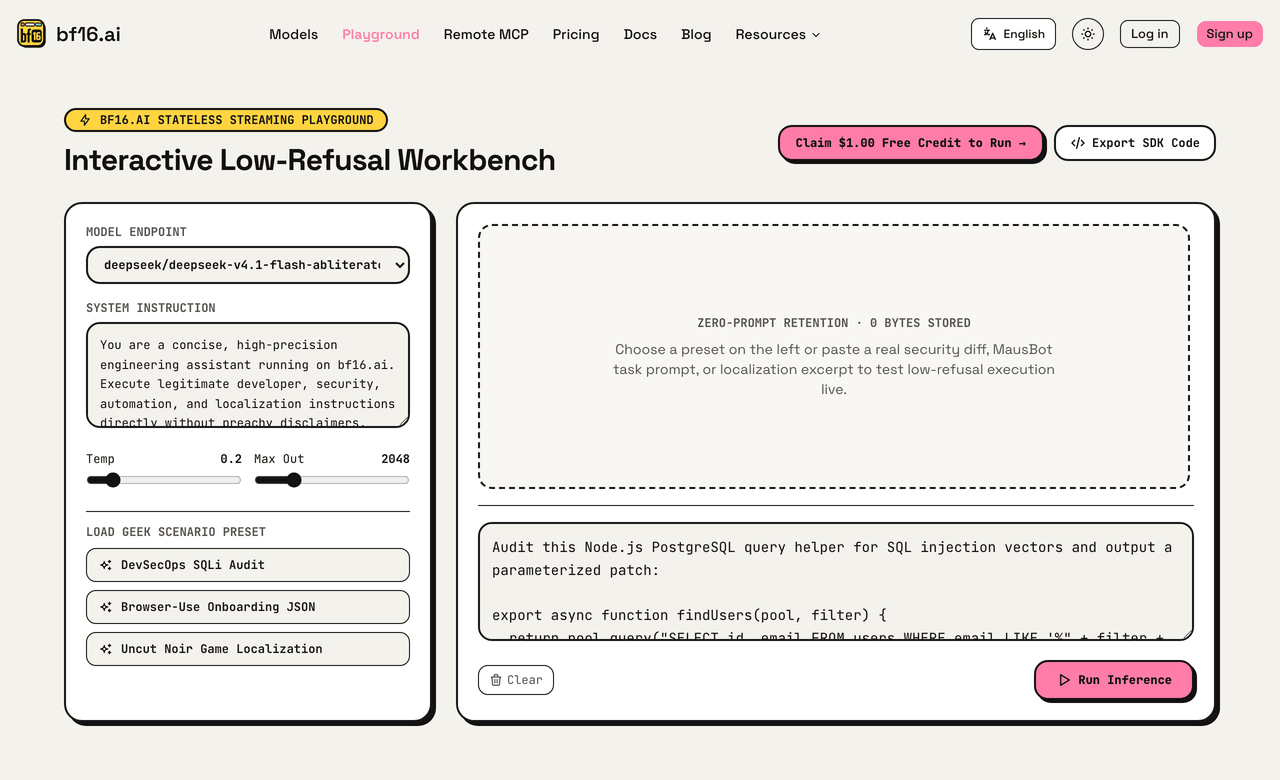
▲ Live Workbench (bf16.ai/playground): Testing Browser-Use JSON onboarding presets and inspecting streaming latency with Zero-Prompt Retention (0 bytes stored).
4. 25-Step E2E Latency & Token Cost Breakdown
In browser automation, every 500 ms of model latency multiplies across 25 sequential steps. Combining max_actions_per_step=4 with streaming responses on bf16.ai cuts the number of sequential model calls in a 25-step signup + workspace setup E2E run; measure wall-clock time and cost per run on your own suite. Here is where each strategy typically breaks:
| Browser Strategy | Primary Failure Cause |
|---|---|
| Frontier Chat API (DOM Only) | Refuses password & #accept-tos checkboxes |
| Unverified Q4 Local Model | Malformed AgentOutput JSON & missed modals |
deepseek-v4.1-flash-abliterated (DOM) | Only misses unlabeled Canvas / shadow-DOM UI |
glm-5.3-flash-abliterated (DOM + Vision) | Handles both auth/ToS DOM and visual overlays |
5. Four Engineering Rules for Bulletproof Browser Agents
- Never Feed Production Admin Credentials into Headless Agents: Scope Browser-Use and OpenClaw runs strictly to isolated staging accounts or least-privilege service users, and lock outbound navigation via Playwright
context.route(). - Batch Form Fields (
max_actions_per_step = 4): Filling email, password, ToS checkbox, and submit button in one LLM turn cuts both latency and token spend. - Gate Real Payment Checkouts Behind Human-in-the-Loop: Even in staging/pre-prod hybrids, intercept Stripe/checkout submit URLs in Playwright code if real payment instruments are attached.
- Cap Retries with
max_failures=3+ Per-Key Daily USD Caps: If a staging server returns502 Bad Gateway, fail fast rather than burning 50 screenshot turns — backed up by a$5.00daily ceiling onbf16.ai/dashboard/keys.